
PRDJ Identification Card
Design references and production specifications for review and approval by Registry Steward.
Front of Card
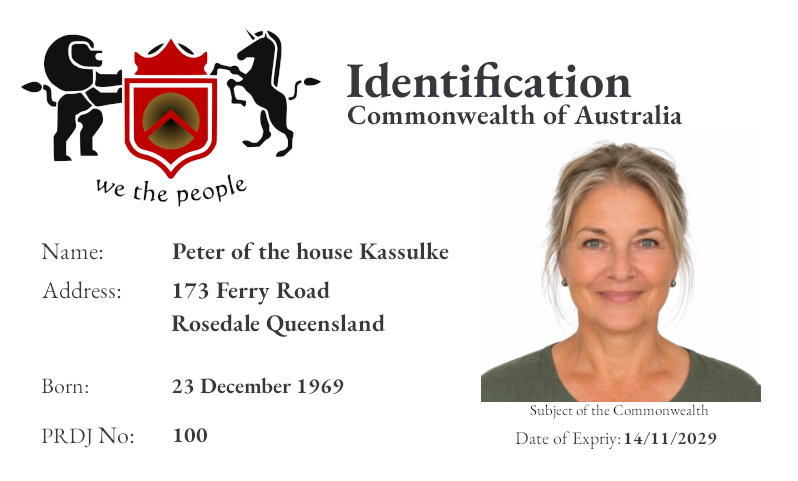
Front – Production Instructions
Reproduce the design shown above, using
EB Garamond throughout.
Font Download
Please download and install
EB Garamond, including
Regular, Bold and Italic styles.
Download EB Garamond – Google Fonts
Typography
| Element | Size | Style |
|---|---|---|
| Identification | 50px | Bold |
| Commonwealth of Australia | 28px | Bold |
| Name | 24px | Regular / Bold |
| Address | 24px | Regular |
| Born | 22px | Regular |
| PRDJ Number | 22px | Regular / Bold |
| Date of Expiry | 18px | Regular |
| Subject of the Commonwealth | 15px | Regular |
Original PRDJ Logo
Please use the original PRDJ logo shown below.
Maintain its colours, proportions and design.
Download Original PRDJ Logo (PNG)
Layout Instructions
- Use the original PRDJ logo provided above.
- Make the logo slightly larger than shown in the reference.
- Position the heading further to the right to accommodate the larger logo.
- Align the name, address and date of birth consistently.
- Keep the address together as a clearly defined block.
- Maintain the photograph’s original proportions.
- Ensure sufficient spacing between all elements.
Back of Card

Back – Production Instructions
Reproduce the design shown above using
EB Garamond throughout,
with centred typography and balanced spacing.
Font Download
Please download and install
EB Garamond, including
Regular, Bold and Italic styles.
Download EB Garamond – Google Fonts
Typography
The following font sizes are approximate,
based on the reference image.
Minor adjustments may be necessary to
achieve the correct proportions.
| Element | Size | Style |
|---|---|---|
| By order of the Chief Steward | 34px | Italic |
| To all those whom it may concern. | 34px | Italic |
| Main declaration | 32px | Italic |
| Website address | 32px | Bold |
PRDJ Heraldic Divider
Please use the original black PRDJ Heraldic
Divider shown below.

Download PRDJ Heraldic Divider (JPG)
The divider incorporates the lion, horse
and shield from the original PRDJ logo.
Maintain its proportions and black colour.
The decorative element should remain
subtle and not overpower the text.
Layout Instructions
- Use EB Garamond Italic for the heading
and main declaration. - Use EB Garamond Bold for the website address.
- Centre all text horizontally.
- Position the PRDJ Heraldic Divider
between the heading and main declaration. - Maintain generous spacing between
the heading, divider and declaration. - Adjust the declaration’s font size
or line spacing slightly if necessary
to maintain a balanced layout. - Ensure the words “the Law” remain together
at the end of the declaration,
rather than leaving “Law” on its own line. - Position the website address centrally
at the bottom of the card. - Maintain sufficient margins around
all text and decorative elements. - Keep the overall design elegant,
clean and uncluttered.